Exhibitor Marketing Materials

FESPA Middle East 2026

Exhibitor Marketing Materials

Banners, Logos and Promotional Materials

FESPA Middle East 2026 Logo - DOWNLOAD

If you would like personalised marketing materials please contact exhibitors@Fespa.com

We are able to provide the following: 

  • Email Banners
  • E-invites
  • Social Media Banners
  • Social Media Posts

FESPA

Training Videos

Please refer to our 2024 training videos for more information:

Exhibitor Portal Training Video - Click here

Swapcard Training Video - Click here

Exhibitor Profile

After logging into the exhibitor portal you will need to update your company information. This information will be pushed over to the FESPA Swapcard event APP.

Top Four Tasks

  • Complete your basic exhibitor profile information.
  • Select your Industry Category
  • Access your unique Promo Code to provide your customers with a discount on entry tickets.
  • Complete your staff personnel registration.

CLICK HERE TO ACCESS THE PORTAL

Login Email: This is set as your company’s Swapcard contact you supplied when you signed your contract. If you have not received an email stating you as the Swapcard contact, please email exhibitors@fespa.com

For 2026 you can access the Middle East Swapcard event via the exhibitor portal.

Password: Click the login button below, and you will be redirected to the Swapcard landing page, enter your email and create a password. This password will also be the password you will need to use for the portal.

For support email exhibitors@fespa.com


Exhibitor Badges

You can register for staff badges via the exhibitor portal - click here

You can find import templates in the portal to bulk upload your teams. 

Staff badges will be available to collect onsite from Monday 12th January

PLEASE NOTE: Only the Swapcard admin contact has access to this.

Login Email: This is set as your company’s Swapcard contact you supplied when you signed your contract. If you have not received an email stating you as the Swapcard contact, please email exhibitors@fespa.com

Password: Click the login button below, and you will be redirected to the Swapcard landing page, enter your email and create a password. This password will also be the password you will need to use for the portal.

Adding team members to your booth

Once you as the main contact have created your exhibitor profile you can add staff members to the profile by clicking on the Edit/update button next to the Exhibitor Registration Management Portal. 

To control access within the app there are two different codes for registering your team. 

New Registration. 

  • STF - This code allows you to register your team who will be working on your booth at the show.
  • PER - This code allows you to give your personnel full access to your main company booth on Swapcard, assign lead scanning licenses and allow them access to your scanned leads.

For bulk uploads please download the import templates using the Import Registrations button.

Access Disclaimer: Users registered with the "Full Access" registration code have the capability to view all leads and modify booth information.

For support, email exhibitors@fespa.com


Registration Links

Important Notice: Please only register your staff via the Exhibitor Management Registration Page, for visitor registrations share your code and link.

Registration is FREE for FESPA Middle East

You can locate your ATT visitor promo code via the Exhibitor Registration Management Portal. 

Make sure you instruct your invitee to copy the promo code and enter it in the box on the welcome page.

Swapcard

How to update your Swapcard APP


Access to the FESPA Middle East web page: https://app.fespa.com/event/fespa-middle-east-2026

Access to the FESPA APP: https://page.swapcard.com/app/fespa/

The FESPA Swapcard event app is for both visitors and exhibitors to explore what is happening at FESPA Berlin. Features include: Interactive floorplan, conference agendas, speaker information, exhibitor information, your event, QR code and attendee connections. The APP hosts a library of product information added by exhibitors.

Exhibitor Guide to the Swapcard App

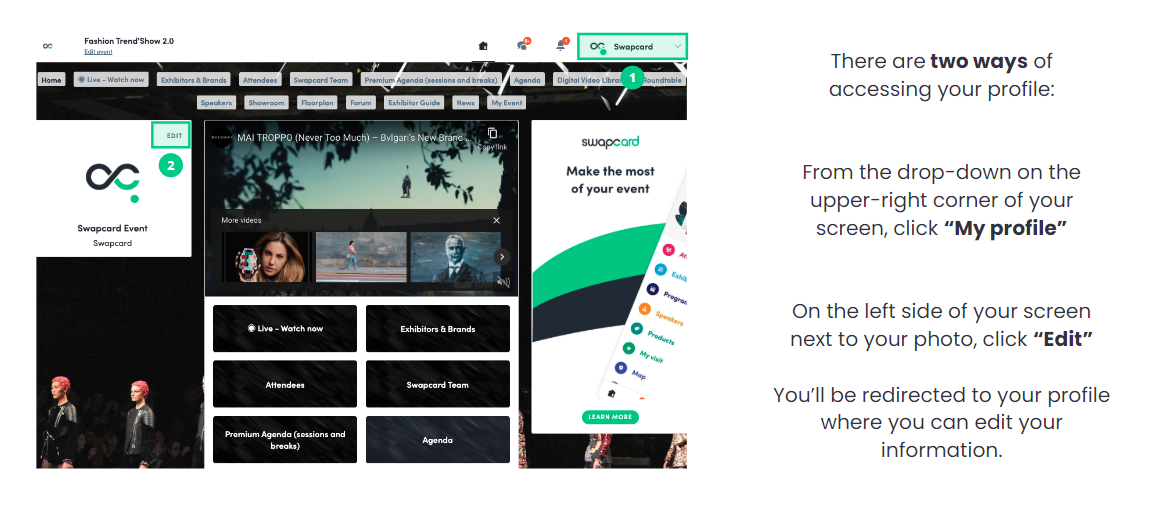
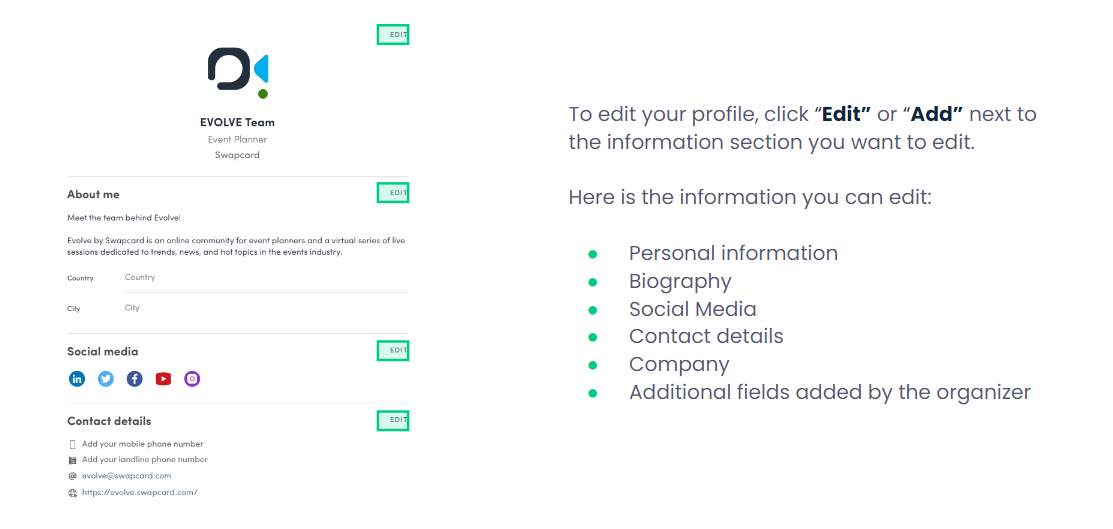
HOW TO EDIT YOUR PERSONAL PROFILE 

Swapcard Profile

edit profile

Adding content to your Swapcard booth:

  • Stand No, Company name, address, company website - Check your correct company profile has been pulled over from the exhibitor portal
  • 3 categories - Check your correct categories have been pulled over from the exhibitor portal
  • Youtube Link, 1 press release and 1 white paper - Under company profile, use the documents & links section to add the following.
  • 3 products - Under company profile use the product section to add products
  • 150-word profile - Check your correct company profile has been pulled over from the exhibitor portal

Important information: If you have upgraded your media package your upload items will be increased automatically. Should you have any issues please contact exhibitors@fespa.com


Meetings

Every exhibitor booth allows visitors and other exhibitors to request meetings on that booth. 

You can manage time slots that are available within the exhibitor centre.

Notifications are sent via the event app and you can assign them to a team member.  


Meetings Personal Profiles 

On you event homepage there is a button labelled ‘My Event’. Accessing this allows you to manage your personal meetings within the Swapcard event. 

 A green rectangle with white text

Description automatically generated


  • My meetings – here is where you can access your personal meeting settings.

  • See my team's meetings – manage team meeting slots on your booth.  

  • Toggle of empty slots – Hide when you are free so no one can book in time. 

  • Hide all meeting slots from your profile - don’t want meetings on your profile? Make them unavailable. 

 A screenshot of a calendar

Description automatically generated


Booth availability VS Individual availability

This slot availability management only affects the Exhibitor Booth and not each individual Exhibitor Team Member's availability. By unselecting a slot in the Exhibitor Centre, Team Members will be unable to send a meeting request for this slot from the Exhibitor’s page.


Lead scanning

Each exhibitor booth is entitled to 1 free licence per booth – this can be accessed via the FESPA app on any smart device. You can assign the licence to a member of your team you have registered as personal in the portal.

Any smart device can be used as a scanner

You can purchase extra licences in the exhibitor centre on the FESPA Swapcard web app or mobile app here: 
Lead scanning licences cost $158
5 x $790
10 x $1580
Unlimited Licences = $3000

For more information and support please contact exhibitors@fespa.com

GUIDE TO LEAD SCANNING

Exporting leads 

Once the event is over, you can export your Team's contacts in Excel format.

For this, in the Exhibitor Center, you need to go to the Leads board tab located in the left sidebar, and then click on the Export leads button.

The exported Excel file will contain the personal details of each Contact, including the Team Member who generated the Contact, time of creation, keywords, and any notes that may have been taken.


Thought Leadership Partner

Keypoint Intelligence logo 


Gold Sponsor

CMYK logo
 

Silver Sponsor

Zhuhai